Google doesn't cut off rendering after 5 seconds, but I understand why you might think it does.

5 second render limit?
I was speaking with a client's developer about rendering time limits, and they mentioned that they were aware of a 5 second render limit after which Google stop rendering the page. This is a figure I've heard before, and I know to also not be true.
I do however understand where that figure comes from, and I think it's worth explaining here, because the tests you 'might have done to show this limit are likely skewed by the weirdness of the Web Rendering Service's handling of time.
A quick overview of how Google renders pages
When Google crawls a page, it fetches the initial page with Googlebot, and then it passes the HTML to their Web Rendering Service (WRS), which is at its heart a headless Chrome instance.
Any further resources that are needed to render the page, such as CSS and JS files, are fetched by the crawling infrastructure, sent back through the crawling pipeline, and then passed back to the headless Chrome instance for rendering.
This different approach in fetching resources is perhaps one of the biggest differences between how Google renders pages and how a normal browser does. In a normal browser, the browser itself fetches the resources.
But another difference is time.
Learn More:
For more information on how Google renders pages, I recommend reading the JavaScript SEO basics guide from Google Search Central.
Testing the 5 second render limit
So let's put this to the test. I created a simple page that would delay for a random amount of time between 3 and 6 seconds before returning the content. The page is available at https://testing.tamethebots.com/timer.html.
This does a couple of different time measurements. The first is a simple setInterval that counts up every second, and updates the page with the seconds and a time stamp.
<script>
    // we update the title element every second
    let seconds = 0;
    setInterval(() => {
        seconds++;
        const now = new Date();
        const timeString = now.toLocaleTimeString();
        if (seconds === 1) {
            document.getElementById('first-time').innerHTML = `First time the timer was updated: ${now.toISOString()}`;
        }
        document.title = `WRS Timer - ${seconds}s -  ${timeString}  - \{TametheBots\} Testing Site`;
        // we update the h2 element with id testing-time every second
        document.getElementById('testing-time').innerHTML = `Testing time in WRS - ${seconds}s -  ${timeString}`;
    }, 1000);

</script>
The second does a couple of fetch requests to a PHP script that will delay for a random amount of time between 3 and 6 seconds before returning the content, and collect some timing information:
<script>
    async function fetchData() {

        return await fetch('https://testing.tamethebots.com/doinstuff/partone.php', {
            method: 'POST',
            headers: {
                'Content-Type': 'application/json'
            },
            body: JSON.stringify({ action: 'firstTwo' })
        })
            .then(response => response.json())
            .then(data => {
                // if div#result is empty or contains "waiting", update it with the result of the first API call
                if (document.getElementById('result').innerHTML === '' || document.getElementById('result').innerHTML === 'waiting') {
                    document.getElementById('result').innerHTML = data.prose;
                } else {
                    // otherwise, prepend the result of the first API call to the existing content of div#result
                    document.getElementById('result').innerHTML = data.prose + document.getElementById('result').innerHTML;

                }
                return true; // return true to indicate that the first API call was successful

            })
            .catch(error => {
                document.getElementById('result').innerHTML = `API Call 1 failed: ${error}`;
                return false; // return false to indicate that the first API call failed
            });

    }
    async function fetchData2() {
        // fetch the second API call
        return await fetch('https://testing.tamethebots.com/doinstuff/partone.php',
            {
                method: 'POST',
                headers: {
                    'Content-Type': 'application/json'
                },
                body: JSON.stringify({ action: 'secondTwo' })
            })
            .then(response => response.json())
            .then(data => {

                // if div#result is empty or contains "waiting", update it with the result of the second API call
                if (document.getElementById('result').innerHTML === '' || document.getElementById('result').innerHTML === 'waiting') {
                    document.getElementById('result').innerHTML = data.prose;
                } else {
                    // otherwise, append the result of the second API call to the existing content of div#result
                    document.getElementById('result').innerHTML += data.prose;


                }
                return true; // return true to indicate that the second API call was successful
            })
            .catch(error => {
                document.getElementById('result').innerHTML = `API Call 2 failed: ${error}`;
                return false; // return false to indicate that the second API call failed
            });
    }

    (async () => {
        const startTime = Date.now();
        document.getElementById('start-time').innerHTML = `Start time: ${new Date(startTime).toISOString()}`;
        const firstCallSuccess = await fetchData();
        if (firstCallSuccess) {
            await fetchData2();
            const endTime = Date.now();
            // we update the end-time span with the timestamp of when the second API call is done
            document.getElementById('end-time').innerHTML = `End time: ${new Date(endTime).toISOString()}`;
            const totalTime = (endTime - startTime) / 1000;
            // we append the total time taken to the existing content of div#result
            document.getElementById('result').innerHTML += `<br><br>Total time taken for both API calls: ${totalTime.toFixed(2)} seconds.`;
        }
    })();
</script>
The fetch requests are POST requests to make sure we don't run into any caching issues.
Let's run this through the URL Inspection tool and see what happens.
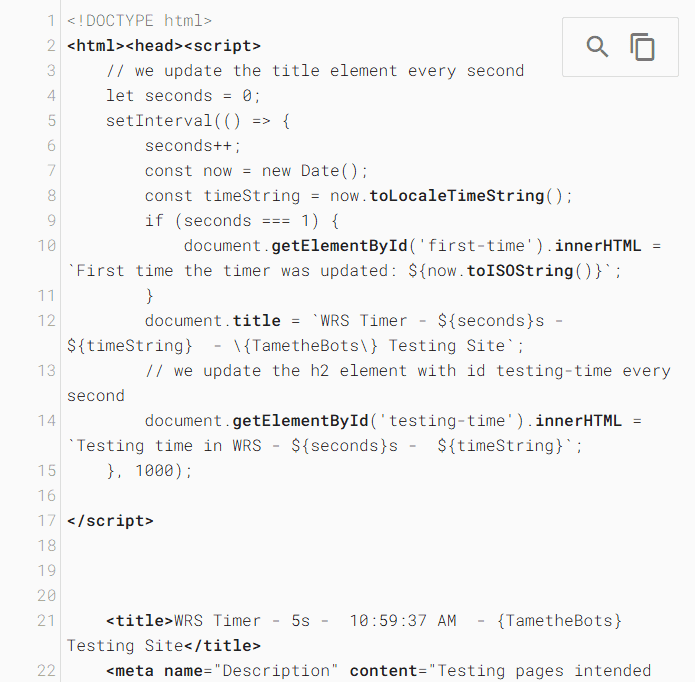
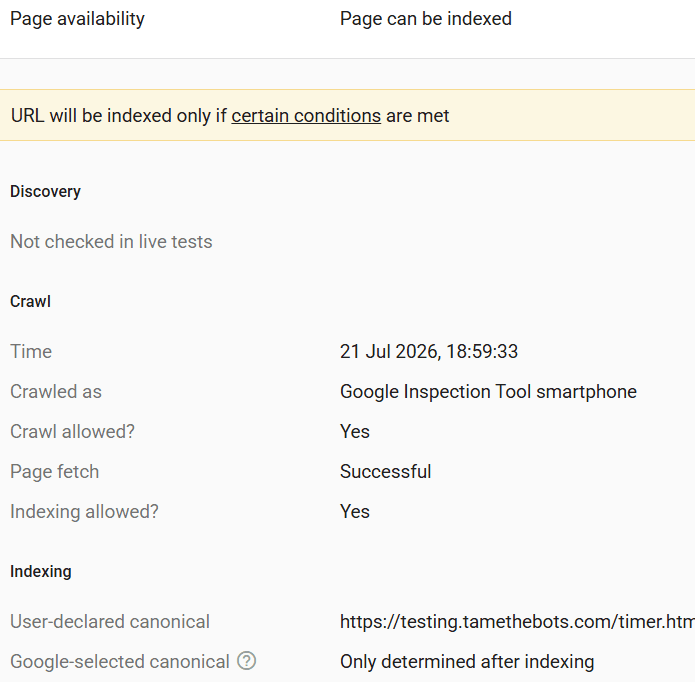
Looking at the screenshots, you can see the setInterval() loop ran for 5 seconds, and updated the title element. The time given, 10:59:37 AM, is in PST, (Always on Mountain View time, which is UTC-7). The second screenshot shows the time the test was run, 18:59:33, is in my local time, which here in the UK is BST (UTC+1). So the test ran for 5 seconds, so in UTC time, the test ran from 17:59:33 to 17:59:37, or 5 seconds.
So, a rational conclusion would be that the WRS has a 5 second render limit, right?
Bending the fabric of time to its will
Well not quite. The WRS does time in its own way. Rather than the hardware clock, like you have on your computer or server, the WRS uses a virtual clock that they can control. This means that they can speed up, slow down, or even pause time for the headless Chrome instance if they choose.
How do we know that 5 seconds is not a limit? Remember those api calls that were made? These are delayed server side, for between 3 and 6 seconds. So the total time for both api calls could be anywhere between 6 and 12 seconds, longer than the famous 5 second limit.
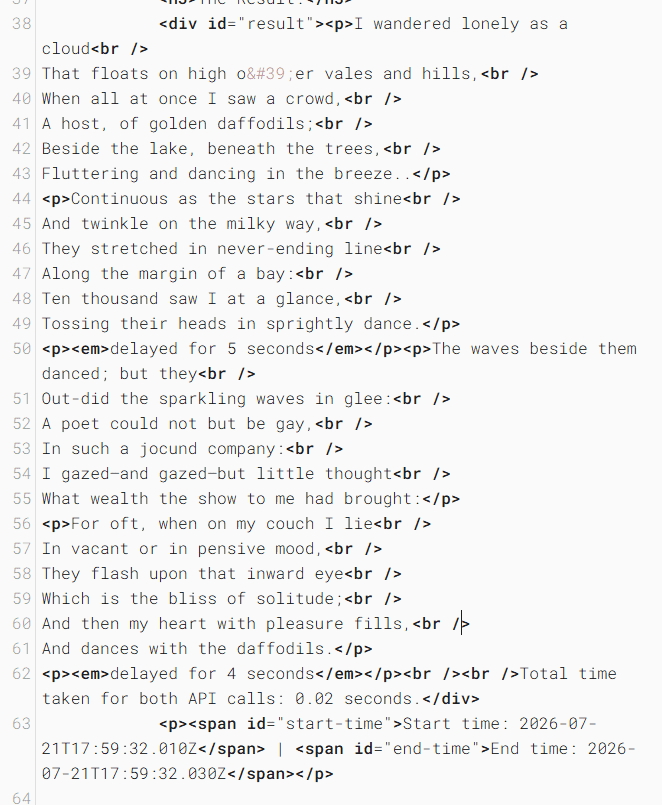
And yet, the WRS was able to render the page and return the content, something that would not be possible if there was a 5 second limit.
But what's with the time stamps in the results?
We can see that the first API call was returned after a delay of 5 seconds, and the second API call was returned after a delay of 4 seconds.
However, the reported total time is 0.02 seconds? How is that possible?
Remember that the WRS uses a virtual clock? It freezes time whilst requests are made. So the 0.02 seconds is not the actual time taken for the requests, but the time taken for the WRS to process the requests and insert the results into the DOM.
That's confirmed by the Start time and End time stamps, which are in UTC.
Well, that's the testing tools, but what about real indexing?
The results are the same, this page was indexed by Google, and using the URL Inspection tool, we can see that the page was rendered and indexed correctly, with the same behavior as the live test.
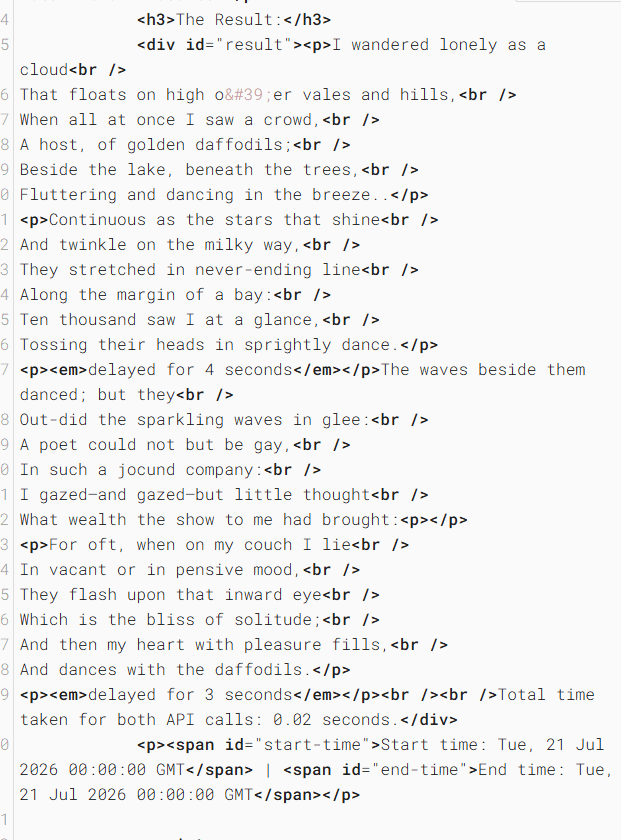
There is one small difference, in indexing, the time itself always starts at midnight UTC, so despite the page being indexed at 10:57:42 GMT:
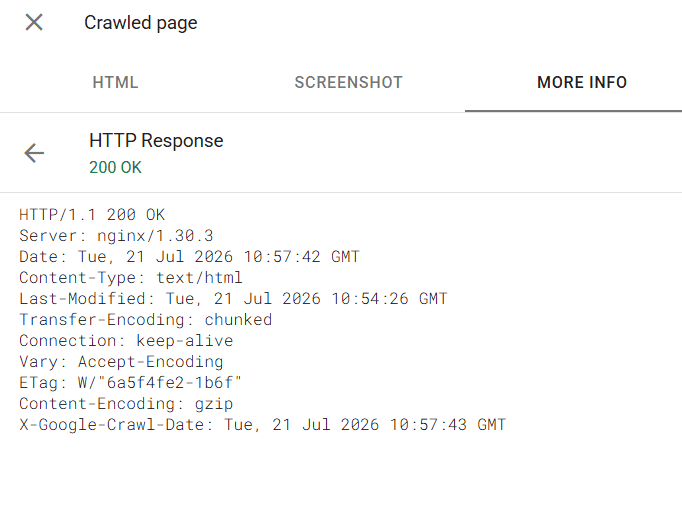
The timestamp for the first and second API calls are 00:00:00, or midnight UTC, and the total time taken is 0.02 seconds, the same as the live test. (since indexing I changed the format of the time stamps to include milliseconds, hence the different format of the time stamps in the live test and the indexed page).
So, when does rendering finish?
There has to be some point Google decides that rendering is finished, and the page is ready to be indexed. This is not a hard time limit, but rather is based on observing the Event Loop to determine when the page is idle, and no further rendering is needed.
This video from Martin Splitt, a Google Search Advocate, explains this event loop behavior, and is well worth watching (the video is set to start at the relevant point, but I recommend watching the whole video if you have the time):
But surely there is a limit?
The WRS naturally does have a limit, it can't render forever, imagine a page that has an infinite loop, or a page that keeps fetching more and more data, the event loop would never be idle, and the page would never finish rendering.
To simulate this, I created a page that would keep fetching data from the server, and never stop. Each call did a 3 second server-side delay. This page is available at https://testing.tamethebots.com/longrun-timer.html.
Testing showed that this cut off, for this case, was fairly variable, but the live testing tools mostly cut off after 16 - 18 calls, or 48 - 54 seconds.
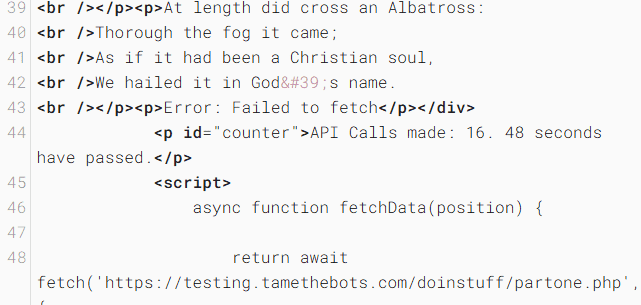
Actual indexing of this page showed that the page was indexed, but only 10 calls were made, or 30 seconds.
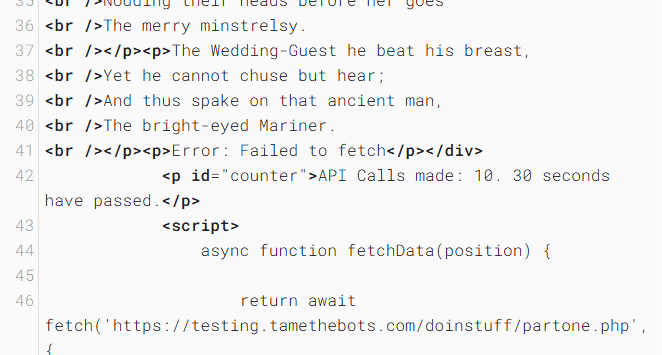
But again, this seems somewhat variable, and naturally, no actual user is going to be waiting for 30 seconds for a page to load, so this is not a real world scenario.
WRS's patience is not infinite, but it is more than 5 seconds, and it is way more than the average user possesses.
Further reading
I highly recommend reading this excellent article by Tony McCreath with some very interesting insights into how the WRS handles time, and other things. Tony’s Theory of Googlebot Relativity
About the Author:
Dave Smart
Technical SEO Consultant at Tame the Bots.
< How Similar are Google and Bing's AI Results for a site?
24th Jun 2026 // updated: 24th Jun 2026